Fast. Beautiful. Private. Smooth. The next-generation image and video viewer.

Dense, beautiful grid browsing. High-quality viewing with two-page spreads and vertical scrolling. Search images and videos by what's in them, with cutting-edge on-device AI. Smooth browsing even in libraries of 100,000+ images. Opens 60+ image, video, and audio formats. Built for privacy above all: everything stays on your PC and nothing is sent anywhere.
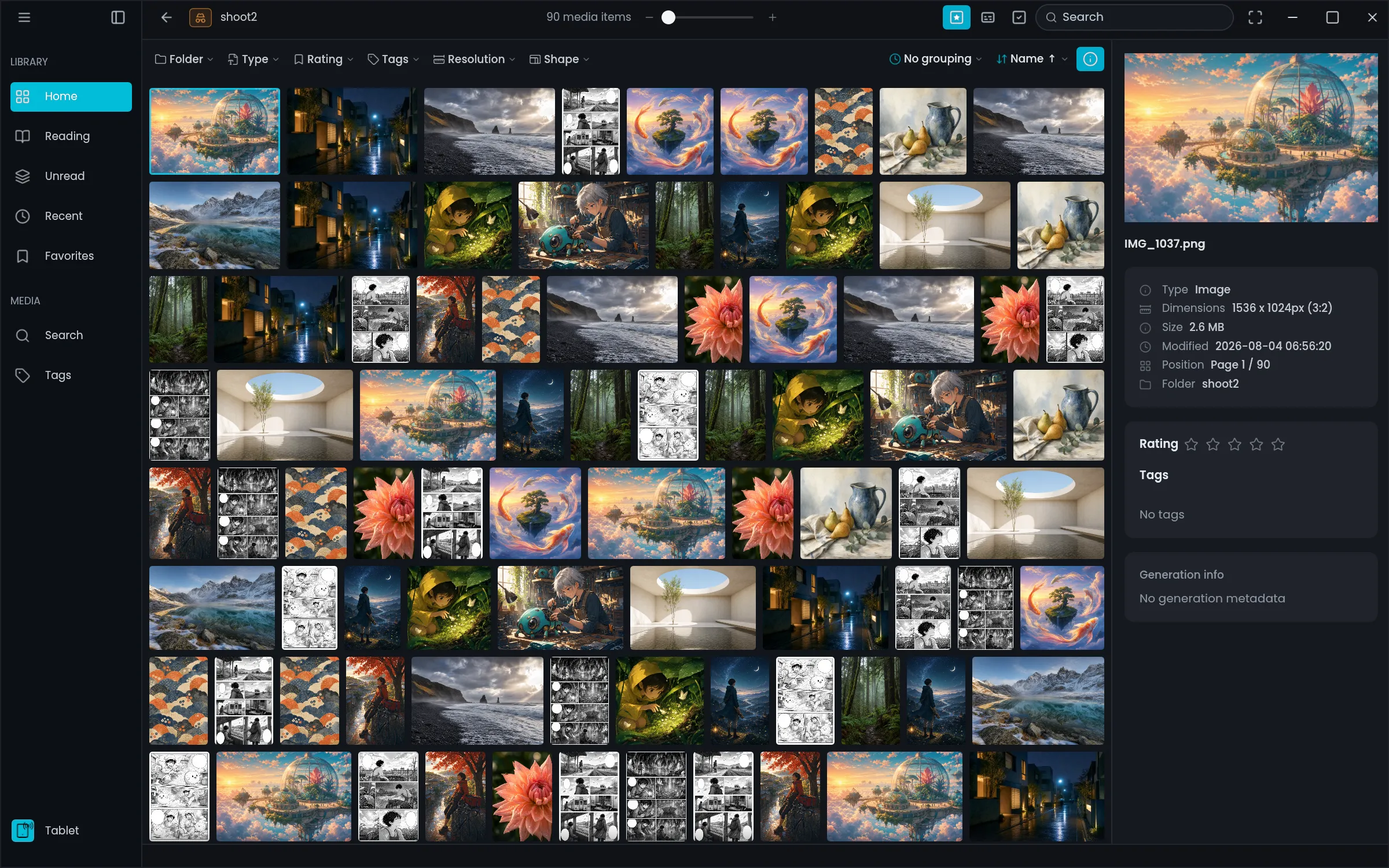
Mekurio's grid view — mixed-size images arranged in an adaptive grid

Dense, beautiful grid view

Images of any aspect ratio fill the grid edge to edge, never cropped. Filter by folder, type, rating, tag, resolution, and more, and group by month or day of modification. Even folders of tens of thousands of images scroll smoothly.

Find images by what's in them, with on-device AI

Type words like "sunset over the sea" or "girl with glasses" to find images and videos with similar content in the open folder. The AI runs entirely on your PC.

Made for AI-generated images and videos

See the prompt, model, seed, sampler, and more for images made with Stable Diffusion WebUI (A1111), ComfyUI, or NovelAI, right in the details panel. Copy any field with one click, or find images by the words in their prompts. Advanced search also filters by steps, CFG scale, and seed. Generation info in MP4 videos made with ComfyUI is read too.

High-quality reader with spreads and vertical scroll

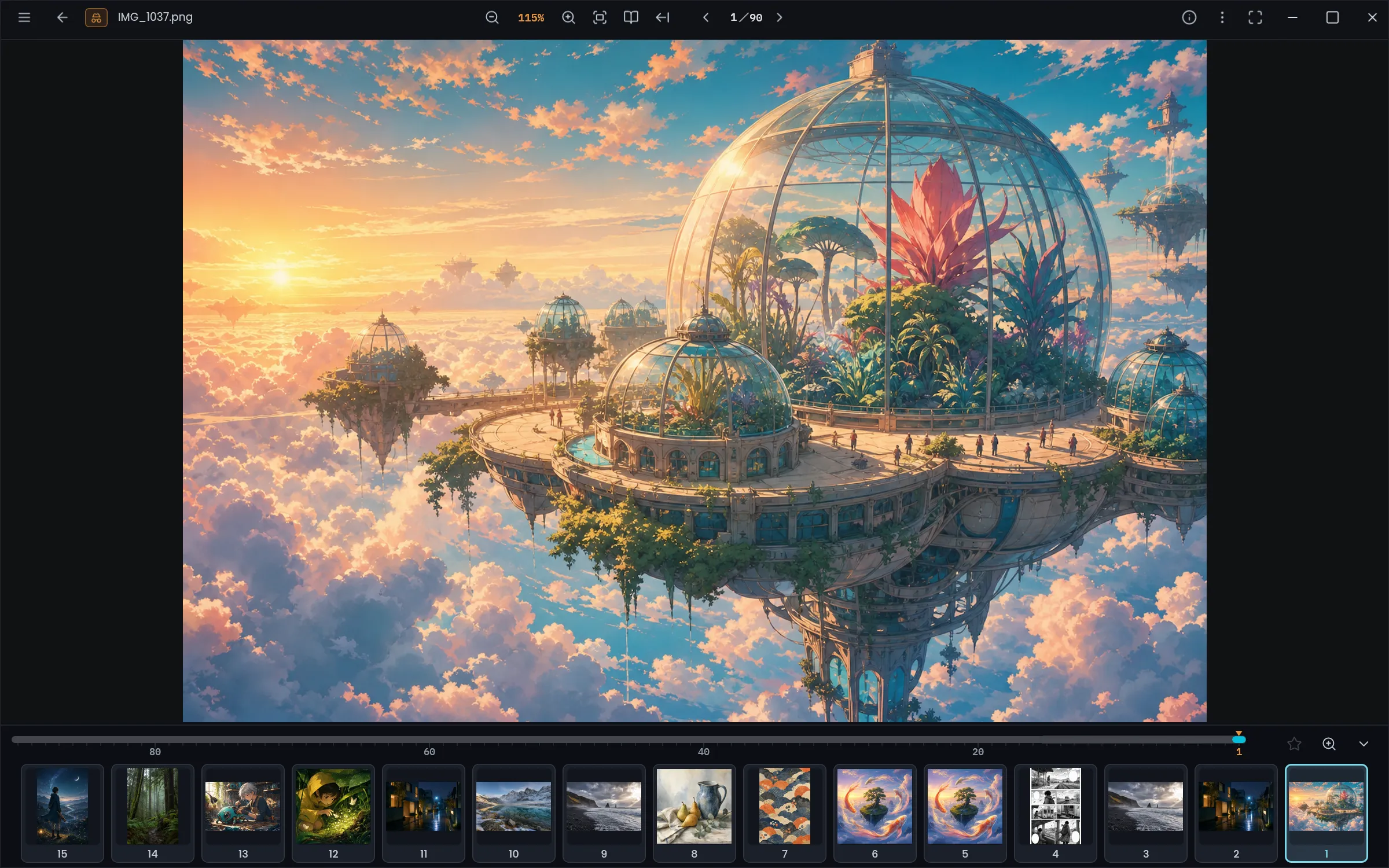
A built-in high-quality scaler automatically picks the best-looking rendering method for each zoom level. Two-page spreads and right-to-left reading for manga, seamless vertical scrolling for webtoons and PDFs. Move around comfortably with the minimap and thumbnail bar, and pick up where you left off even after closing the app. HDR and wide-gamut images display as intended on capable screens.

Mekurio's reader — minimap and thumbnail strip along the bottom

Synced viewer: browse the grid, view it big

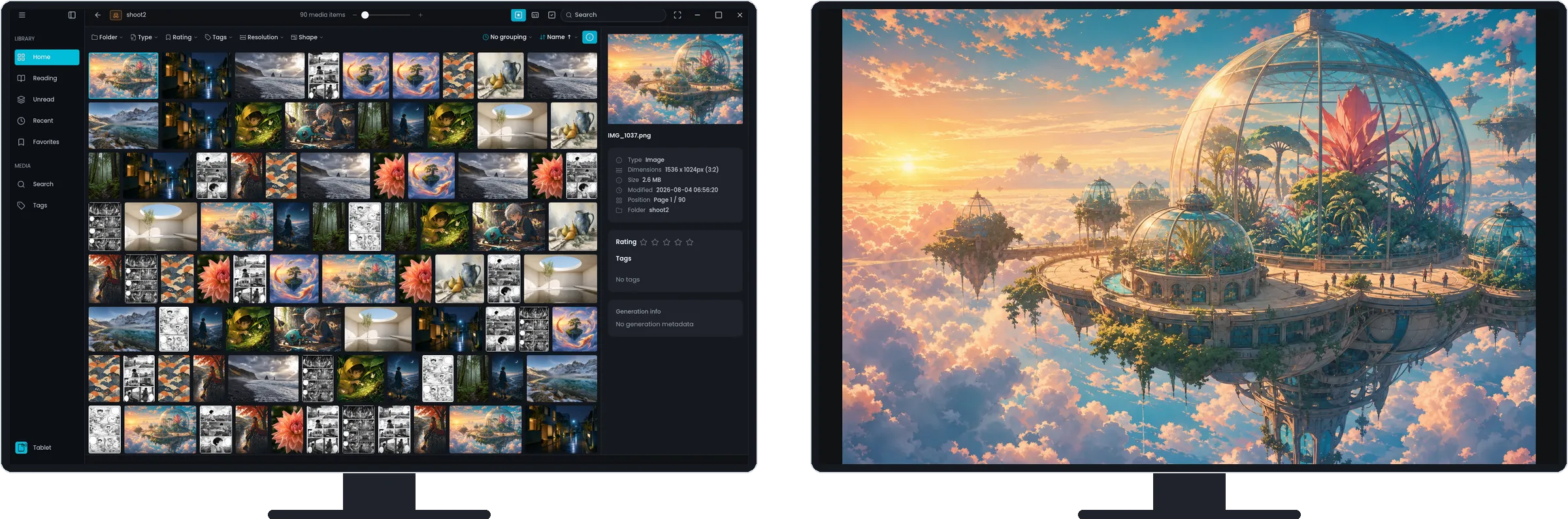
Show the image you pick in the grid large in a separate window. Pick another image in the grid and the view follows, so you can browse comfortably in the at-a-glance grid while looking at each image closely. With multiple displays, use one screen for the grid and the other for viewing. On a single screen, snap the two windows side by side with Windows Snap.

Mekurio on two displays — the image picked in the grid on the left screen is shown large in the synced viewer on the right screen

Blazing fast, even past 100,000 images

A thoroughly optimized viewing engine keeps things smooth and snappy, even when you open huge numbers of images.

60+ file formats

From JPEG and PNG to JPEG XL, PSD, EXR, and RAW. ZIP / CBZ archives and PDFs open as they are, and video and audio play in the same window. The full list is in the feature list below.

* HEIC and AVIF are displayed through Windows extensions from the Microsoft Store: both need the HEIF Image Extension, plus the HEVC Video Extensions for HEIC or the AV1 Video Extension for AVIF.

Privacy comes first

Your images, and everything about how you view them — history, tags, thumbnails, metadata — are stored on your PC and never sent anywhere. Even the AI behind content search runs only on your PC. Launch in Private mode, and not even history, caches, or thumbnails are written to your PC.Privacy Policy

Features

Viewing

  • Open folders, archives (ZIP / CBZ), and PDF directly
  • Two-page spreads and right-to-left reading
  • Vertical scrolling (read webtoons and PDFs as one continuous strip)
  • Search inside PDFs, and select and copy their text
  • Jump to distant pages instantly with the minimap and thumbnail strip
  • Viewing positions remembered (continue where you left off)
  • Fullscreen mode and command palette
  • Brightness, gamma, and contrast adjustment; rotate and flip
  • Show the image picked in the grid large in a second window (synced viewer)
  • Animated images (GIF / animated WebP)
  • Video playback (controls over the video, loop and play-next)
  • Video super resolution (sharpens enlarged video with RTX Video on NVIDIA RTX GPUs; turn it on in the NVIDIA app)
  • Audio playback (keeps playing while you browse images, and works with your keyboard's media keys)
  • HDR and wide-gamut display

Formats

  • JPEG / PNG / GIF / WebP / JPEG XL
  • HEIC / AVIF (displayed via Windows extensions)
  • PSD / PSB, EXR, SVG
  • TIFF, BMP, TGA, ICO, DDS, QOI, PCX, JPEG XR, PNM (PBM / PGM / PPM)
  • RAW preview (DNG / CR2 / CR3 / CRW / NEF / NRW / ARW / SR2 / RAF / ORF / RW2 / PEF / RAW)
  • Archives and documents: ZIP / CBZ, PDF
  • Video: MP4 / M4V / MOV / MKV / WebM / AVI / WMV / MPEG
  • Audio: MP3 / AAC (M4A / M4B) / WAV / FLAC / AIFF / Ogg / Opus

Library & organizing

  • Registered folders with unread / reading / finished and favorites
  • Adaptive grid that stays light with tens of thousands of images
  • Filter by type, rating, tags, resolution, shape; group and sort
  • Tags and 5-level ratings
  • Search by name, tags, and AI generation prompts
  • Content search in the open folder (find images and videos by what's in them)
  • Group by modified date (month or day) and jump along a timeline

Metadata

  • EXIF capture info (camera, lens, aperture, shutter speed, ISO, focal length, …)
  • AI generation info (Stable Diffusion — A1111 / ComfyUI / NovelAI formats)
  • Ratings imported from XMP sidecars, embedded XMP, and EXIF
  • Color info (ICC profile, HDR, wide-gamut detection)

Privacy

  • Private mode (writes no history or caches at all)
  • Local-only (no data collection or transmission)
  • Choose where the image cache is stored, or keep it off the disk

Pro (coming soon)

AI upscaling, tablet and phone viewing, text import (vertical or horizontal writing), Lightroom catalogs, and content and similar-image search across your whole library, as a one-time purchase. Pricing and release date are in preparation.

Free download

Get it from the Microsoft Store. No ads, and no Mekurio account to create. The app is available in English and Japanese. Requirements: Windows 10 (version 2004 or later) / 11, 64-bit.